BitScope DSO Version 2.6 Production ReleaseThe beta program is complete and BitScope DSO Production Version 2.6 is now available for download! We recommend BitScope users upgrade from 2.5 and earlier. It is a production release so it never expires and it's available now for Windows 8, 7 and XP, Mac OS X (10.6 & later), Intel Linux based on Debian or Fedora and ARM (Hard Float) Linux including Raspbian. This version is compatible with all 22 supported BitScope models and offers significantly improved performance when used with any BitScope model, especially with lower powered computers like Raspberry Pi but similar gains are available for all platforms. For example, DSO is now quite usable with older Pentium-II and early Celeron PCs and Macs. On more modern systems DSO is now much faster with higher display frame rates and smoother digital phosphor operation even when using older BitScopes or connecting via slower networks. Read More... 2013-12-14 BitScope DSO updated for Server CompatibilityDSO has been updated for compatibility with the forthcoming BitScope Server and the Raspberry Pi based BitScope Server demo system. Various bug fixes have been applied and additional connection help added to the SETUP dialog to help first time users get up and running and support for newer firmware revisions has been added. This update applies to all platforms; Windows, Linux, Max OS X and Raspbian. Build ID DL06B. 2013-11-12 BitScope DSO, Logic, Chart, Meter and Library updatedChanges in the Linux kernel that have appeared in recent editions of Ubuntu and Fedora caused problems for these applications when used with some model USB BitScopes. These included BS300, BS310, BS50 and some BS1xx models. This update addresses these issues. If you use Ubuntu or Fedora and run into trouble with one of these models please upgrade to the latest production release. Windows, Mac and Raspberry Pi are unaffected. 2013-11-05 BitScope DSO 2.7.DG17E Update (for Linux 3.8+)This update fixes a bug reported when some USB BitScope models are used with Fedora 19 or Ubuntu 13.10. These include BS300, BS301, BS310, BS50 and BS320. Some early editions of BS100 and BS120 may also be affected. If you have difficulties connecting with a Linux system which uses the kernel revision 3.8 or later and you have reviewed our USB troubleshooting guide to ensure it's not a different issue, we recommend you upgrade to this release. Note: this issue does not affect Windows, Mac OS X or Raspbian (Raspberry Pi) or Linux distribtions (like Debian Stable) that don't us this kernel so upgrade is not required for these platforms. 2013-11-04 BitScope DSO 2.7.DG17D Update (All Platforms)This update fixes a number of bugs reported since we updated the Sydney BitScope and upgraded it to a new model (BS325). We recommend you use this latest development release (DSO 2.7) to access the Sydney BitScope. You can use DSO 2.7 for your own locally connected BitScope as well, but DSO 2.6 (production version, to be published soon) is recommended instead because production releases never expire and do not connect to Sydney by default. BitScope DSO upgraded for Mac OS X MavericksApple released Mavericks last week so we've been working to ensure our software remains compatible. 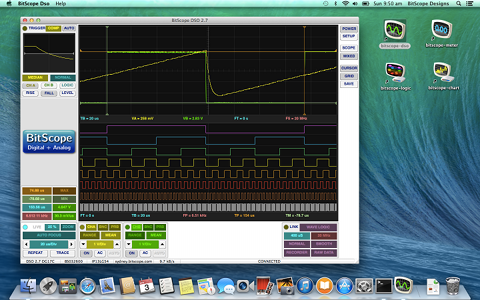 BitScope DSO 2.7 on Mac OS X 10.9 Mavericks The good news is that Apple have made the transition easier this time. Mavericks was quite a smooth upgrade for us and there were very few surprises with the associated Xcode tools either. We've been testing with Mavericks developer previews for a while so it did not surprise us that it runs most of our software without change. However, we have found a few unusual bugs in some situations so we're working on a set of update releases to address them. First cab off the rank is BitScope DSO 2.7 build DG17C which runs Mavericks and it works very well with all the current model BitScopes. We will be testing it with legacy models during the week to confirm they're also fully compatible with Mavericks. Read More... 2013-10-11 BitScope DSO 2.7.DG17B update (Mac OS X)This is the new development branch for DSO (Version 2.7). The existing development branch (Version 2.5) is in feature freeze and will become the next production release (Version 2.6) as soon as the outstanding bugs have been squashed. BitScope DSO 2.7 will introduce a range of new features including improved mixed signal data logging, presets and user configuration, slow timebase scrolling displays, a multi-band spectrum analyzer for baseband and RF work and automatic signal measurements (similar to BitScope Meter). This is the Mac OS X release. 2013-10-04 BitScope DSO 2.7.DG17B update (Windows & Linux)We've commenced the new development branch for DSO (Version 2.7). The existing development branch (Version 2.5) is now in feature freeze and will become the next production release (Version 2.6) as soon as the outstanding bugs have been squashed. In addition to the Raspberry Pi update already reported, BitScope DSO 2.7 will introduce a range of new features including improved mixed signal data logging, presets and user configuration, slow timebase scrolling displays, a multi-band spectrum analyzer for baseband and RF work and automatic signal measurements (similar to BitScope Meter). Available for Windows, Linux and Raspberry Pi. Mac OSX coming soon (ChangeLog) BitScope DSO 2.7 update (for Raspberry Pi only)BitScope DSO evaluates signal statistics including Vrms, Vpp, Vmin, Vmax and Vmean as well time related features such as, signal period, rise time, slew rate, duty cycle and so on. Some calculations can be quite computationally intensive. This interim update optimizes their evaluation to improve performance on Raspberry Pi. DSO 2.5 | Windows 7 & 8 Performance Boost | DA15EHigh speed USB BitScopes prefer low latency USB connections for highest performance.  However, Windows 7 & 8 assign high latency when they automatically install the driver. Reduce the USB driver latency to give your USB BitScope or BS10 a major performance boost when used with Windows. BitScope DSO has been updated for to take advantage of this and our other apps will be updated the same way soon too! If you use Mac OS X or Linux you can also benefit from this upgrade. Simply upgrade to the latest DSO to take advantage of it; there are no driver settings you need to change for Mac OS X or Linux. 2013-06-01 DSO 2.5 | Mac OS X Mountain Lion Release | DA15DBitScope DSO now works with the latest Mac OS X as part of our Mountain Lion Update. 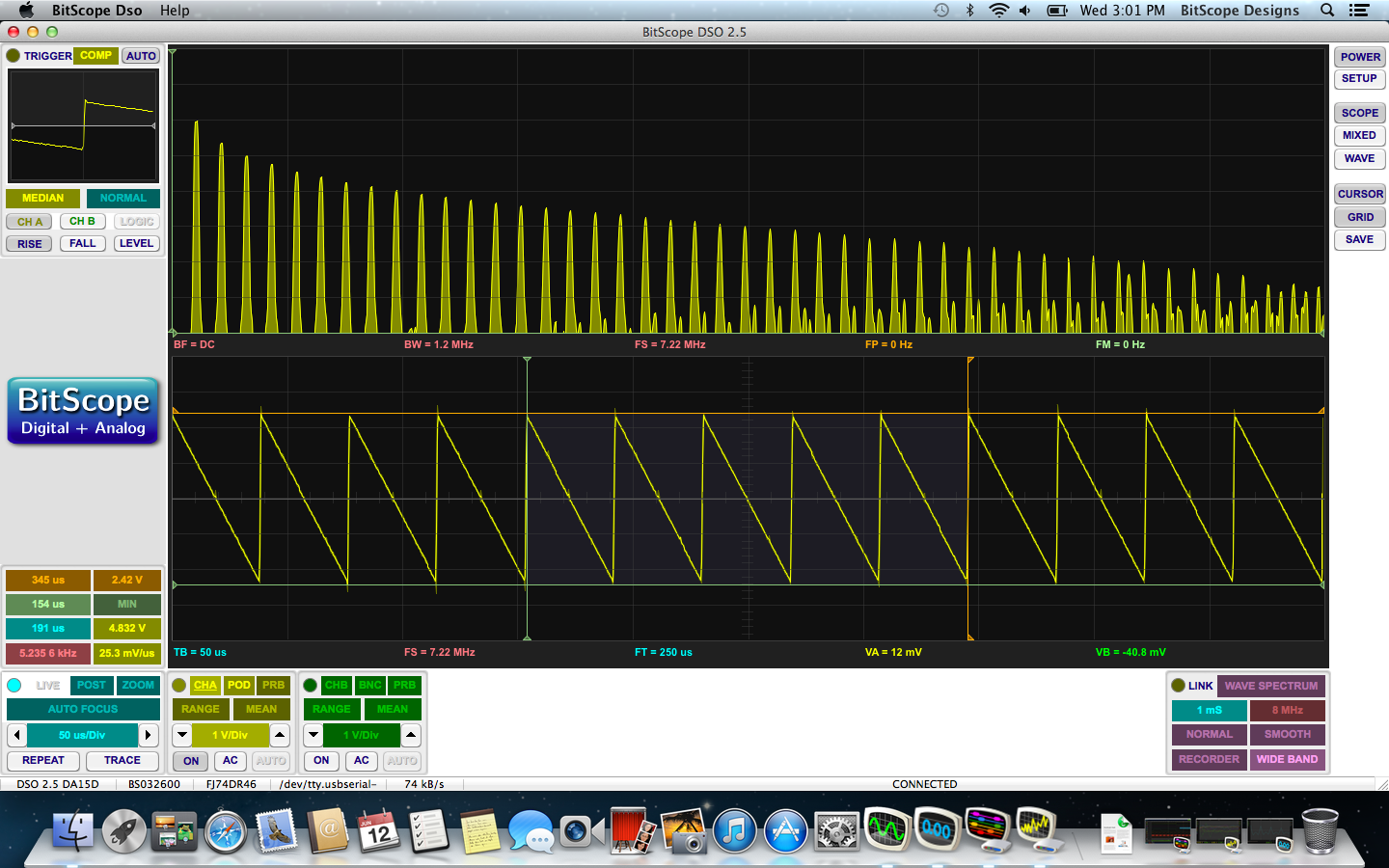 If you were using an older version you may have noticed Apple's recent Mountain Lion update prevented access to some network model BitScopes including Sydney. This has been fixed in this release. To install simply download the update and drag the app to your Applications folder. This release is significantly faster due the use of the a new link driver so we've updated for Windows and Linux too. The driver is activated by default for Linux and Mac OS X and can be manually enabled via the FTDI device properties for the USB device created by Windows when a USB BitScope is first connected by reducing the USB latency timer setting to 2ms. 2012-11-30 DSO 2.5 | Windows 8 32/64 bit Release | CK20DBitScope DSO is now Windows 8 compatible for Intel/AMD based computers.  We've also improved DSO operation when run on Windows 7 64-bit systems and the USB driver installation is now fully automatic. BitScope DSO has been updated to support new features such as RF mode for use with BS10 and color coded triggers. The display engine waveform rendering has been improved and Windows 8 systems now rival the Mac OSX and Linux platforms for waveform display resolution and quality. We've also fixed a conflict affecting Ubuntu 12.10 due to an issue with Modem Manager; BitScope does not use Modem Manager but if you need it on your system for other reasons it can now be safely installed. Numerous subtle bugs have been fixed and performance improvements made, so download the update, especially if you're running a Windows 8 or Windows 7 64-bit system! 2012-07-25 DSO 2.5 | Windows and Linux 64 bit Release | CG24AThis release introduces 64-bit versions for Windows 7 and most 64-bit Linux distributions.  This update has been made possible with the release of the new BitScope Library also available as a 64-bit native release. If you are running Windows 7/64 or 64 bit versions of Ubuntu, Debian, Mint, Fedora, RedHat or other 64 bit Linux distributions we recommend you upgrade to the 64 bit version of DSO. We've also fixed bugs caused by Ubuntu's adoption of overlay scrollbars as part of their "touch ready" Unity Interface. DSO now runs without the need for the tweaks reported at BK04D More touch-screen enhancements are on the way to take full advantage of Unity and Gnome Shell in Linux and eventually Metro in Windows 8 (using our Act On Touch Interface). The Mac OS X version has also been updated but it is not a DMG release (it contains no USB driver) so grab the driver here if you have not already installed it. Email dso@bitscope.com with bug reports or questions. More updates coming soon! 2012-03-14 DSO 2.5 | minor bug fix and feature update | CB28CThis update consolidates the changes made in the recent Act on Touch release (CB20A). Probe scaling (up to 100:1) is now supported when used with BS10 and the DSO user guide is now installed as part of the software package (the documentation itself is not yet fully up to date with the new DSO 2.5 features though). Thanks to everyone who reported bugs and offered suggestions based on the previous release; the waveform generator bug preventing output from being turned off is fixed. Logic capture defaults to high speed ("hair trigger") mode. The Mac OSX window placement and start-up glitches are fixed. Various other subtle bugs including slow connection with BS1xx models have also been fixed. 2012-02-24 DSO 2.5 | Perseus "Act on Touch" release | CB20AThis major update adds three exciting new features to DSO, compatible with all current BitScopes. 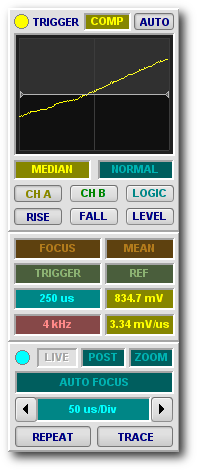
It is the first major step towards our goal to support touch-screen devices based on Windows Touch, Android and iOS. Act on Touch InterfaceOur new Act on Touch Interface now means you can simply click, drag or select any parameter using your finger (on a touch-screen device) or the mouse (on a PC or Macintosh) to change its value or select a related function. Shown on the right are three control panels that use ATI.
Using ATI is easy. Click and drag up/down or left/right on any parameters to adjust its value. Click on the left or right edge of the parameter to select the previous or next parameter value. Right-click (or control-click on a Mac) to pop up a menu for the parameter and double-click the parameter open a value editor to type in a specific value or select a default value. Collectively we call these UI interractions Acton Gestures. 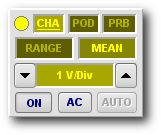 They apply to trigger, preview and main waveform displays too. Many objects on a display can be clicked and/or dragged to change location or value. For example, the trigger level can be adjusted by moving the trigger cursor and measurement cursors or waveform feature bands on the main display can be moved to make various measurements. The analog channel control panels are also now simpler, smaller and easier to use thanks to ATI as can be seen on the left. There are lots of other changes and improvements in this release, especially relating the timebase, automated waveform measurement and feature tracking tools and mixed/logic capture. We're busy updating the DSO manual to describe all these new features in detail and we'll publish this soon. Until then, the DSO 2.2 manual still provides useful information to get you started so in the interim please just click, drag and select on any parameter and see what happens. All parameter changes are immediate and real-time: you will see the result on the display as soon as you change them. We value your feedback, it helps us improve this software, so please email dso@bitscope.com with any bug reports or questions you have. |
Copyright © 2023 BitScope Designs